Project Management software and A.I. can help, but only if…
- You understand project management first, and
- If you still do some of the parts yourself – it can never do it all for you.
PM Software like Microsoft Project can’t:
- list the tasks, or
- estimate times and costs, or
- decide dependencies.
It can only ever be a drawing tool and ‘what-if tool’.
So in this respect Project Management is an art as well as a science, and always will be.
For example: the allocation of tasks to people: – this decision is based on many factors
- who you’ve got available,
- how well a task needs to be done,
- how much risk a task can take,
- whether you want to develop people or just get the work done,
- one person does it quicker but less well,
- another person does it better but slower,
- how much a person will enjoy doing a task,
- giving people variety,
- whose turn it is,
- and how busy the people are on other things.
The judgment of a manager does this in seconds, and a computer will probably never be able to do it.
Basically software needs to know everything before it can calculate correct answers – and it will never know everything. Not just about who gets allocated which task, as described above, but knowing every task, every resource, every alternative, …it’s just not possible.

For example
- Some tasks can be done faster by putting more people on them, while others can’t.
- Some tasks can overlap while others can’t.
- Some tasks can be done quicker by reducing their quality.
- Some tasks vary a lot in how long they take, while others don’t.
Trying to tell a computer about this is a total nightmare! Traditional software doesn’t usually have fuzzy logic so it can’t cope with people who you would rather give certain jobs to, it has to be “Yes or no”, “Can they do this task or not?” – which is not how real life is.
However er A.I. is getting pretty good at fuzzy tasks.
These are the stages of project planning and implementation that I think A.I. really can help with:
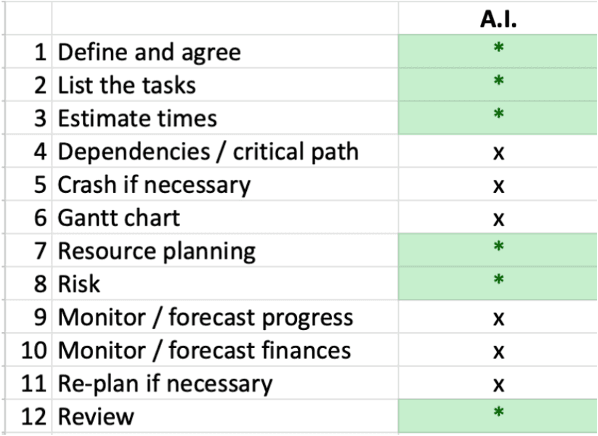
And the interesting things is that if you pair up A.I. with traditional PM software you get pretty much everything covered:
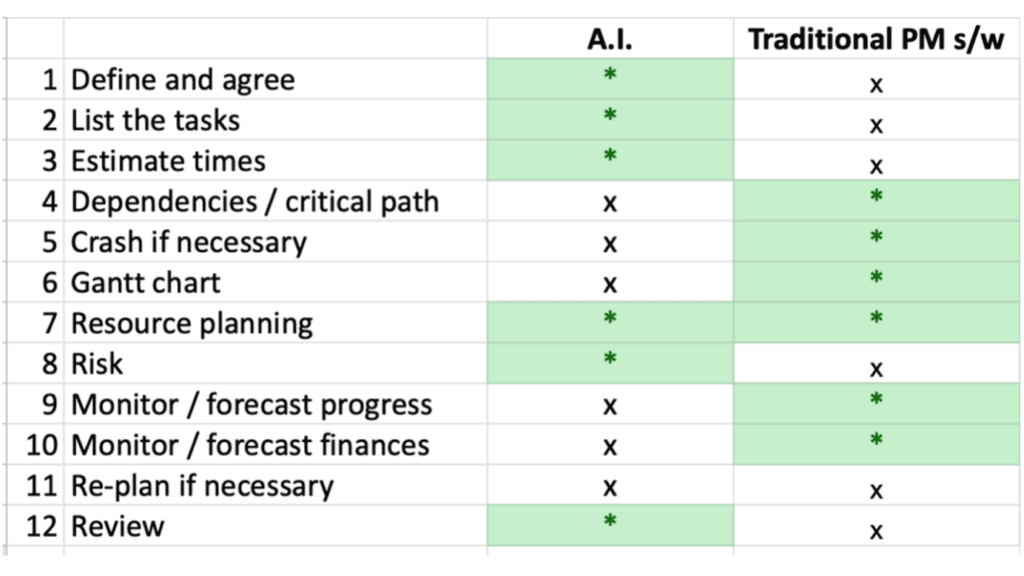
However, as with my example above of judging who to give which task to, the human skills are still vital to running a great project – here’s how all three would mesh together:
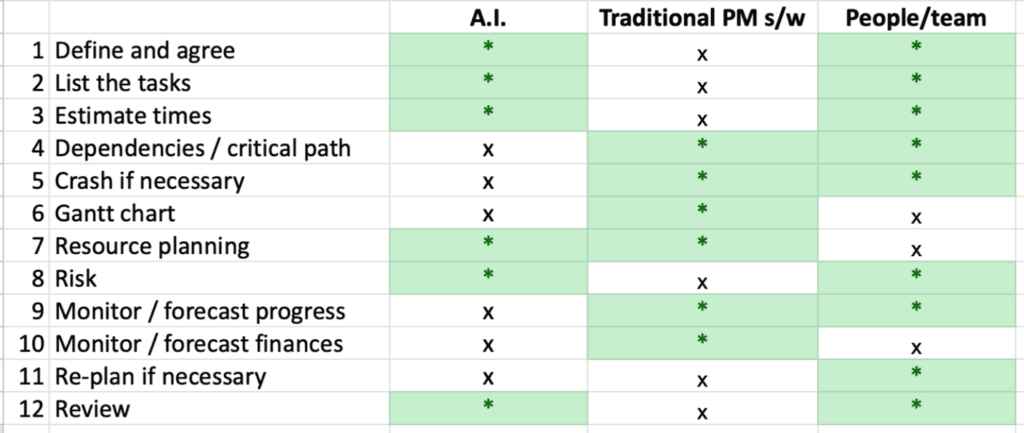
You can see the a great Project Manager would use a bit of A.I., some traditional software (even Excel would be good) and their people skills, to cover everything needed to plan and deliver a great project.
Opacity of computerised systems: I do have one reservation with software generally, however good it is, which is that you can’t really see what it’s doing or how it’s doing it. This is particularly true of A.I. which works in a mysterious way, there isn’t even a designer who has put in rules, it has just evolved – and sometimes it lies or makes things up. So it’s great as a tool but you should always be checking it and judging it, never blindly relying on it. So you need to really UNDERSTAND project planning before you jsut hand its over to A.I. to “do it all for you”.
If all you want to see / work on is two dimensional (e.g. projects over time) then Excel is fine, – for example a Gantt chart is a great 2-D view of one project – but if you want a solution to a three-dimensional problem (e.g. projects people and time) then you have to get dragged into some sort of database type software – you have to feed in what you know and press the button for an answer like “When will project A be finished?” – …but then the trouble is you can’t see what it’s doing, so if it does something stupid (which it will!) you won’t know….

What is the alternative to handing it over to A.I., or trying to construct one big complex and very clever database plan, which is invisible in the heart of the machine? Maybe it’s better to keep things simple, and do a high-level plan, with some medium level and detailed plans for parts of your project all separately, rather than to feed everything into one big crazy plan that you can’t visualise or understand. Then you can see each part of your project and use your experience and judgment to evaluate their feasibility, and to think about what actions to take as things change.
Most PM software I have tried is either too complicated with a big barrier to entry, (and if some of your managers don’t know how to use it that’s always going to be a problem), or it’s very simplistic like Monday.com and doesn’t do the job, it just claims that it does. Or it’s a sub-tool like Trello or Excel that does one thing really well, so it’s not really project management software as such, but you can use it as part of your planning process. It’s this last approach that I prefer. e.g. here’s what Trello looks like:

So I recommend using both project management software and A.I. as a helper but not as the core of your project plan. For example, do you want the software to automatically correct things, in which case it will probably do things that are stupid, or do you want to be able to manually move things around? Personally I think it works best if the software just highlights a problem, say a clash of key resources, and you then move things around, while the software tells you whether there is still a problem or not.
Conclusion
- Don’t expect software or A.I. to do everything for you
- Don’t waste loads of time looking for software, or spend lots of money buying software “that will run your projects for you”
- You will still have to engage with project management and understand project management, because software can never do the real meat of it for you.
- Yes, you will need software as a way to communicate projects and to draw them out but the heart of the planning is an art and always will be.
- There is no substitute for learning about things like critical paths and Gantt charts and really understanding them
- Rescheduling of projects, considering the loading of multiple projects, and deciding who gets which tasks, have to be done manually (although sometimes with the help of software and A.I.) – it would be a disaster to entrust everything to an automatic system without your intervention.

P.S. If you’re interested in self development, check out my ultimate resource, all of my best courses in one place, affordable price, you’ll have them for ever: https://www.lifeskillscollection.com/interested